Enter the two fractions, choose the operation and you get the result already reduced, with its steps: 3/4 − 1/6 gives 7/12. For three or more values, or a calculation with parentheses, switch modes; the table below tells you which.
Your result
✓ Exact
56
Enter two fractions to begin.
(1/2) + (1/3) = 5/6
To reuse this answer, its numerator and denominator must each have at most 100 digits.
Edit stacked fractions
Decimals and mixed numbers appear as exact fractions. Edit fields and operators; the written expression updates when you apply, calculate or close. The keyboard edits the selected field. You can scroll long expressions within the editor.
Try a calculation
Examples
Your answer: bar and number lineSee the size of your answer at a glance
Enter two fractions to begin.
Percentage, rounding and historyPercentage: ≈ 83.33%
Automatic mode preserves exact repeating decimals. Choosing decimal places rounds only the display; the exact fraction is preserved.
Multiply with 2(1/3) or (1/2)(3/4). Multiplication and division are evaluated from left to right. Use × or grouping for decimals and mixed numbers.
Recent problems
New problems stay in this tab only, up to 10 input entries without answers. Previously saved history remains until you clear it.
No recent problems yet.
No account needed. Calculations run on this device.
Key facts
Reduced result
The sign goes on the numerator: 10/15 is shown as 2/3 and 2/−8 as −1/4.
Negative mixed number
The sign applies to the whole number: −3 1/10 equals −31/10, so −3 1/10 + 1/10 = −3.
Decimals
Decimals are typed with a point, and repeating decimals go in parentheses: 0.(1) is 1/9.
Limits
Up to 100 digits per number, 1,024 characters per expression and whole-number exponents from −100 to 100. A denominator of 0 is rejected.
Adding fractions with unlike denominators
You can also see the mathematics.
To add fractions, the parts must be the same size. One half becomes three sixths and one third becomes two sixths.
1/2 + 1/3 = 3/6 + 2/6 = 5/6
The same whole, split into six equal parts.
1. Halves: 1/2 fills one of 2 equal parts; that is 3 of 6.
1/2
↓
3/6
2. Thirds: 1/3 fills one of 3 equal parts; that is 2 of 6.
1/3
↓
2/6
3. Join them: solid parts show 1/2 (3/6); striped parts show 1/3 (2/6).
5/6
3 parts + 2 parts = 5 of 6 parts
Beyond one whole
A fraction can be greater than one.
Nine quarters fill two whole units and leave one quarter. The improper fraction 9/4 and the mixed number 2 1/4 have exactly the same value.
9/4 = 4/4 + 4/4 + 1/4 = 2 1/4
Two complete wholes and one quarter of a third: 9/4 = 2 1/4.
Combine 3/4 cup of flour with another 1/8 cup of the same flour. The total is 7/8 cup. Enter only the numbers in the calculator, then put the unit back on the result.
3/4 + 1/8 = 6/8 + 1/8 = 7/8
Six eighths plus one eighth make seven eighths of a cup.
3/4 = 6/8+1/8=7/8
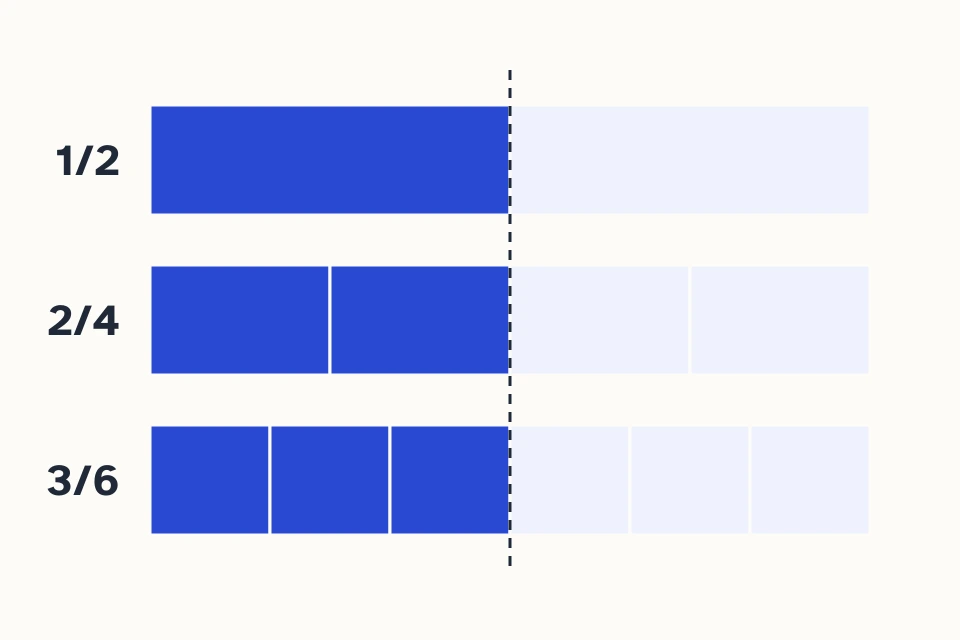
Equivalent fractions: different parts, the same value.
The numerator counts the blue parts; the denominator counts all equal parts. Multiply both terms of 1/2 by 2 to get 2/4. Divide both terms of 3/6 by 3 to get 1/2. The whole and its blue half stay the same.
This fraction calculator adds, subtracts, multiplies, and divides rational numbers. Enter two fractions in the simple form, choose “Mixed numbers and decimals” for a list of up to twenty operands using one operation, or choose “Expression” to combine operations in a single field. The result is reduced exactly, and the steps show how it was obtained.
How to use the fraction calculator
For a calculation with two fractions, enter each numerator above its denominator, choose the operation, and select “Calculate.” The numerator tells you how many parts you take; the denominator tells you how many equal parts make up one whole. In 3/4, each part is one quarter of the whole and you take three parts.
Enter the two values. In the simple form, each field accepts a signed integer. To enter 3/4, put 3 on top and 4 on the bottom. For a whole number such as 2, enter 2/1.
Choose an operation. Addition, subtraction, multiplication, and division use different methods. In advanced mode, the selected operation applies to every operand.
Read the result and open the steps. Check the exact fraction first. Then review the common denominator, product, reciprocal, or reduction used in the calculation.
“Mixed numbers and decimals” provides complete-value fields. Enter 1/2, -3, 0.25, or -1 1/2 in one field; the sign of a mixed number applies to the whole value. Add fields up to a maximum of twenty operands. For example, 1/2 + 1/3 + 1/6 equals 1 when you select addition. These fields repeat one operation, and subtraction and division proceed from left to right.
To combine operations, choose “Expression” and enter the calculation in the single field. Powers are evaluated first, then multiplication and division from left to right, and finally addition and subtraction; parentheses change the grouping. For example, 1/2 + 1/3 × 3/4 = 3/4, while (1/2 + 1/3) × 3/4 = 5/8. The ^ symbol accepts integer exponents from −100 to 100; 0^0 is undefined. For a guided explanation and more examples, see the fraction expressions calculator. For the most common mistakes, read the guide to common fraction mistakes.
What to do with your result
Links to fraction simplification, conversion, and comparison open dedicated tools. In this calculator, “Use result” places the exact fraction in the first field for the next operation; enter the second value before calculating. If the result exceeds the 100-digit input limit, the button explains why it cannot be reused.
Open “Percentage, rounding and history” to change how the result is displayed. A percentage expresses a value out of one hundred: 1/2 is 50%. “Decimal places” rounds only the display and keeps the exact fraction. For example, 1/3 displays as 0.33 to two decimal places; the exact difference is 1/300. If the next digit is 5 with no remaining difference, rounding moves away from zero: 0.125 becomes 0.13 and −0.125 becomes −0.13.
“Your answer: bar and number line” shows parts of a whole and locates the value relative to zero. Very large results use an explanation instead of a detailed bar. The explanation steps show the conversion, operation, and reduction relevant to your calculation.
What an exact result and a reduced fraction mean
An exact answer preserves the full rational value. For example, 2/4 and 1/2 represent the same quantity because dividing the numerator and denominator of 2/4 by 2 gives 1/2. To simplify a fraction, divide both terms by their greatest common divisor (GCD). The GCD of 2 and 4 is 2; the GCD of 1 and 2 is 1. That makes 1/2 irreducible: its terms have no common divisor greater than 1.
The calculator puts the sign in the numerator and keeps the answer’s denominator positive. Thus, 2/−4 is normalized to −1/2; the two values are equal. Zero displays as 0, whether you entered 0/7 or obtained it by subtracting 1/2 − 1/2. This normalization gives the result one consistent standard form.
A proper fraction, such as 3/4, has a numerator smaller than its denominator in absolute value. An improper fraction, such as 5/4, represents one whole or more in absolute value. When a value exceeds one whole, it can also be useful to read it as a mixed number: 5/4 equals 1 1/4. For a negative value, −5/4 equals −1 1/4. To divide by a nonzero fraction, use its reciprocal, or multiplicative inverse: the reciprocal of 2/3 is 3/2, and their product is 1. Zero has no reciprocal. The improper fraction remains the exact form for further calculations; the mixed form expresses whole units plus a remaining part.
Check the equivalence: multiplying or dividing the numerator and denominator by the same nonzero number preserves the value. For example, 3/6 = 1/2. Changing only the denominator changes the size of each part and does not produce an equivalent fraction.
Make the whole visible. The bars show the same whole split into halves and quarters. To compare values, always divide the same whole into equal parts; check the calculation against the exact fractions and diagrams in this guide.
How each operation is calculated
All four operations start from the same idea: a fraction represents a quantity, and each operation transforms that quantity in a particular way. The examples below show intermediate calculations you can compare with the calculator steps.
+
Adding fractions
Rule: when the denominators match, add the numerators and keep the part size. Reduce the result if possible.
3/8 + 1/8 = 4/8 = 1/2
3/81/8Total: 4/8 = 1/2
When denominators differ, find a common denominator. The least common multiple (LCM) gives the smallest shared positive denominator; for example, 2/3 + 1/4 = 8/12 + 3/12 = 11/12. Write a whole number over 1 before adding it. Practice adding fractions.
−
Subtracting fractions
Rule: make the denominators equal, then subtract the numerators in the order written.
3/4 − 1/2 = 3/4 − 2/4 = 1/4
Starting with 3/4− 2/4Two quarters crossed out1/4 remains
The result can also be negative: 1/2 − 3/4 = −1/4. With several subtractions, keep the parentheses and order. Review a subtraction step by step.
×
Multiplying fractions
Rule: multiply the numerators together and the denominators together, then reduce.
2/3 × 3/4 = 6/12 = 1/2
2 of 3 columns × 3 of 4 rows6 of 12 shaded cells = 1/2
You can also cancel factors before multiplying: 2/3 × 9/10 = 18/30 = 3/5. If one factor is zero, the product is zero. Explore fraction multiplication.
÷
Dividing fractions
Rule: invert only the divisor, provided it is not zero, and multiply.
5/6 ÷ 2/3 = 5/6 × 3/2 = 5/4
Division 5/6 ÷ 2/3→Reciprocal of divisor 5/6 × 3/2→Result 5/4
The product 2/3 × 3/4 covers six of the twelve equal parts of a rectangular whole. First divide the whole into three columns and four rows. Select two columns to represent 2/3 and three rows to represent 3/4. The six cells where the selections overlap show the product: 6/12 = 1/2.
2 of 3 columns3 of 4 rows
Six cells with a pattern and dark border: they show the overlap of 2/3 of the columns and 3/4 of the rows: 6/12 = 1/2 of the whole. The remaining cells belong to one factor or neither.
The diagram does not change the arithmetic rule: 2 × 3 = 6 and 3 × 4 = 12. It does clarify why, in this example, the product of two positive fractions smaller than one is also smaller than either factor. That conclusion does not apply when you multiply by 3/2, which is greater than one.
Place a negative fraction on the number line
The fraction −1/4 lies to the left of 0 and to the right of −1/2. Each interval on the number line below is 1/4: from −1/2 move to −1/4, then to 0, then to 1/4, and finally to 1/2. Equal spacing lets you compare quantities without changing their signs.
−1/2−1/401/41/2
←←←
1/2 − 3/4 = −1/4: start at 1/2 and follow the three arrows to the left: 1/4, 0, and −1/4. Each step is 1/4; the blue point marks the result. Values increase from −1/2 to 1/2 as you move from left to right.
The result 1/2 − 3/4 = −1/4 comes from subtracting 2/4 − 3/4. On the number line, start at 1/2 and move back three steps of size 1/4; you end one step to the left of zero. This path helps you check the sign before reading the decimal form.
Accepted inputs and practical limits
The simple fields separate numerator and denominator and accept signed integers. Advanced mode takes each value in a single field, so you can enter fractions, integers, terminating decimals, or mixed numbers. The format 0.25 represents one quarter. Use a period for decimals; commas may only group thousands, so 1,000.5 is accepted and 0,25 is not.
How to enter values in each mode
Value
Simple fields
Advanced mode
Three quarters
3 on top and 4 on the bottom
3/4
Negative integer −2
−2 on top and 1 on the bottom
−2
Decimal 0.25
1 on top and 4 on the bottom
0.25
Negative mixed number −1 1/2
−3 on top and 2 on the bottom
−1 1/2
The input −1 1/2 equals −3/2: the minus sign applies to both the whole unit and the half. It does not equal −1 + 1/2, which is −1/2. Entering the mixed number in one advanced-mode field prevents its parts from being separated incorrectly.
Advanced mode accepts two to twenty operands and limits each numeric token to 100 digits. In expression mode, the field accepts up to 1,024 characters, and the result numerator or denominator can have up to 10,000 digits; a very complex expression may also require fewer operations or nested parentheses. No denominator may be zero, and a divisor may not have a value of zero.
How to read the steps and decimal form
Open “Show steps” to see what changed in each operation. In addition, check the common denominator and equivalent numerators; in multiplication, follow the product and reduction; in division, look for the divisor’s reciprocal. After each step, cross-multiply equivalent fractions if you need to confirm that they have the same value.
The fraction result is the exact reference. A terminating decimal, such as 1/4 = 0.25, is also exact. A repeating decimal, such as 1/3 = 0.(3), repeats the digits inside the parentheses forever. When the display shows “≈” and a finite number of decimal places, those digits are a rounded approximation, not a new exact equality.
For example, 1/7 has a longer repeating expansion than 1/3. If the decimal display reaches its digit limit, keep 1/7 for further calculations; using a rounded approximation as a new input can accumulate error. The calculator uses integer numerators and denominators, so 0.1 + 0.2 equals exactly 3/10.
Three thirds make exactly one whole. Three values of 0.33 add up to 0.99, leaving a difference of 0.01.
Keep the fraction
1/3 + 1/3 + 1/3 = 1
If you round first
0.33 + 0.33 + 0.33 = 0.99
0.01 (1%) is missing to complete the whole.
Calculate with the exact fraction and round when you present the result.
Examples using real quantities
Study a subtraction and find the mistake
A student calculates 1/2 − 1/3 and wants to know why the answer is 1/6. Convert 1/2 to 3/6 and 1/3 to 2/6; then subtract 3/6 − 2/6 = 1/6. The incorrect calculation (1 − 1)/(2 − 3) does not keep equal-sized parts and also introduces a negative denominator without explaining the operation.
Explain equivalent fractions in class
A teacher can ask the class to explain why 4/8 and 1/2 represent the same quantity. Dividing the numerator and denominator by 4 shows the reduction; the calculator lets students check the result while connecting four eighths to one half.
Combine recipe measurements
If a recipe uses 3/4 cup of an ingredient and 1/8 cup of the same ingredient, the total is 6/8 + 1/8 = 7/8 cup. Keep the unit “cup” out of the number fields and add it back when you read the result. Adding different ingredients can help you count total volume, but it does not replace a recipe instruction for each ingredient.
Subtract a cut length
In a workshop, 3/4 metre is cut from a piece that is 2 1/2 metres long. Convert 2 1/2 to 5/2 = 10/4; then subtract 10/4 − 3/4 = 7/4 = 1 3/4 metres. In advanced mode, enter “2 1/2” and “3/4.” The exact value 7/4 preserves the full measurement; include “metres” when reading the answer so the unit is not lost.
10/4 − 3/4 = 7/4 = 1 3/4 m. Each box is 1/4 m: seven patterned boxes remain and the three cut pieces are crossed out.
Common mistakes and how to fix them
Adding denominators: 1/2 + 1/3 is not 2/5. Convert both fractions to sixths; the correct result is 5/6.
Inverting the dividend: in 5/6 ÷ 2/3, invert only 2/3. The correct calculation is 5/6 × 3/2 = 5/4.
Losing the sign of a mixed number: −1 1/2 means −3/2. To add 1/4, calculate −6/4 + 1/4 = −5/4.
Entering 0 as a denominator: 3/0 does not define a rational quantity. Correct the value before continuing.
Dividing by a fraction equal to zero: 0/7 is a valid zero as an addend or factor, but not as a divisor.
Confusing an approximation with equality: 1/3 is not exactly 0.33. Use 1/3 in later calculations and mark 0.33 as an approximation to two decimal places.
Frequently asked questions
What does 0.(3) mean, and why does “≈” sometimes appear?
The parentheses mark the digits that repeat forever: 0.(3) is 0.333… and equals exactly 1/3. The symbol “≈” marks a rounded decimal: with two digits, 1/3 shows as ≈ 0.33 and the exact difference is 1/300. Later calculations use the fraction, not the rounded decimal.
How do I solve a calculation with parentheses by hand?
First work out what is inside the parentheses, then the rest. In (1/10 + 2/5) ÷ 1/4, the parentheses give 1/2, and 1/2 ÷ 1/4 equals 2. If there is a multiplication or division outside, that operation is done before any addition that is not in parentheses.
How do I enter a power of a fraction?
Put the base in parentheses and use ^ with a whole-number exponent: (2/5)^2 gives 4/25 and (−2/5)^3 gives −8/125. A negative exponent flips the fraction, so (2/5)^−1 is 5/2.
Are my calculations saved?
Calculations run on your device and you do not need an account. The history keeps up to 10 entries, without the answers, and only in your browser if you turn that option on.
YOUR CALCULATOR, CLOSE AT HAND
Save your calculator
Open your browser menu and choose “Install app” or “Add to Home Screen”. You can also bookmark this page.
You are offline. Saved pages and calculations on this device remain available.